IPTV installation: set up any device, step by step
An IPTV installation is three things: install a player app, enter the login your provider sent, and wait for the channel list to build. It takes five to eighteen minutes depending on the device. This page covers the login screens, the TV guide and what to do when it fails.
Every IPTV installation starts with the welcome message
Nearly every failed setup is a correct detail typed into the wrong field.
Whatever service you have joined, the message that arrives after you sign up contains one of three kinds of login, and the rest of the IPTV installation depends on telling them apart before you touch a remote. Read it once, properly.
Xtream Codes: three separate boxes
You are given a server address — sometimes labelled host, portal or URL, occasionally with a port number after a colon — plus a username and a password. All three go on one screen, the one most players call Login with Xtream Codes API: a login against an interface rather than a file.
M3U: one long link, one field
An M3U or M3U8 playlist is a plain text file listing every channel and the address of its stream. You paste the whole link into a single field and give it any name you like; that name is a label for you, not part of the login. If the link contains get.php and a username, it is an Xtream account served as a playlist, and the same account will almost always accept the three-box login instead.
MAC portal: no app at all
MAG boxes and set-top boxes running a Stalker client work the other way round. You send the provider the MAC address printed on the underside of the box, they tie the account to it, and you type a portal address into the box's own settings menu. Android TV boxes are not in this category, despite often being sold beside them: they need a player app like every other Android device.
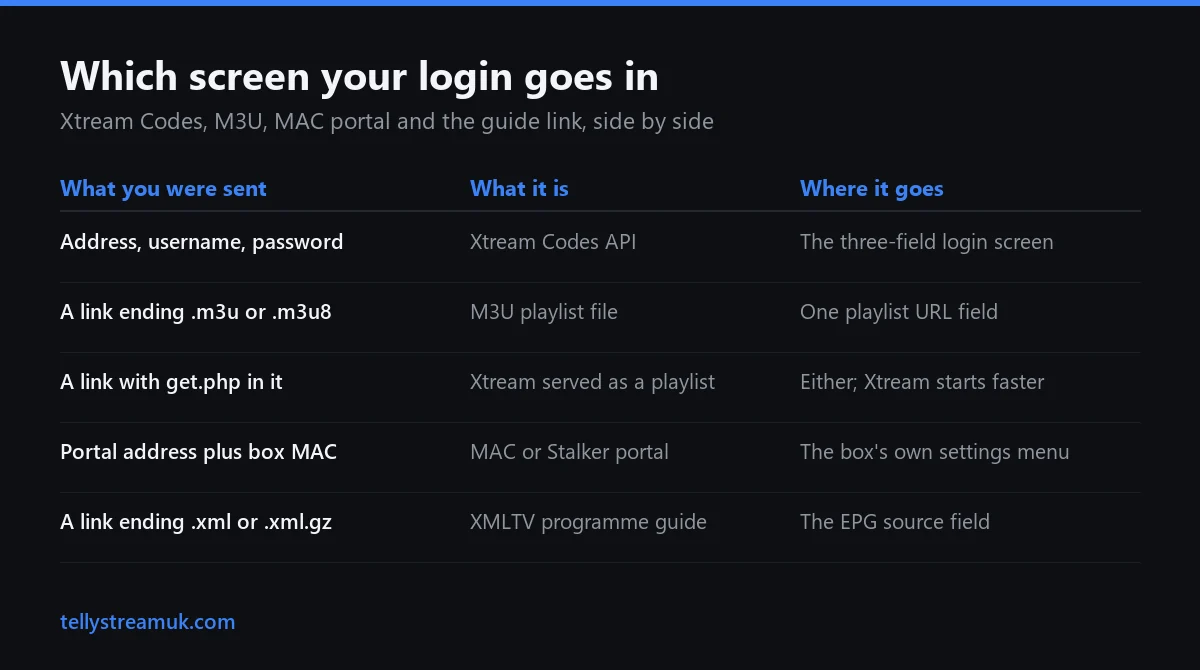
| What you were sent | What it is | Where it goes |
|---|---|---|
| A server address, a username and a password | Xtream Codes API login | The three-field login screen in the player |
| One long link ending .m3u or .m3u8 | M3U playlist file | A single playlist URL field, with a name of your choosing |
| A link containing get.php and a username | An Xtream account served as a playlist | Either screen; the three-box login starts faster |
| A portal address and your box's MAC | MAC or Stalker portal | The box's own portal settings, not an app |
| A separate link ending .xml or .xml.gz | XMLTV programme guide | The EPG or guide source field, further down |
That last row is the one people miss. The guide link is not part of the playlist and will not work in the playlist box, which is why so many otherwise perfect setups end up with a working channel list and an empty schedule.
The four steps every IPTV installation shares
Players differ in wording, in price and in where they hide the guide setting. The sequence underneath is the same on all of them: a Fire TV Stick, a Samsung set, an Apple TV box or a laptop.
Install a player from the device's own store
IPTV Smarters Player and TiviMate are the two most people settle on for Fire TV and Android; on Samsung Tizen and LG webOS it is Smart IPTV or whichever equivalent your set's store carries, and on Apple TV it is Smarters again. Tizen and webOS cannot run Android packages, so on those sets the app has to come from the television's own store. Smart IPTV publishes builds for Tizen, webOS, LG Netcast, Android, Google TV and Fire TV, and charges a one-off €5.49 (billed in euros, roughly £4.70) per device against that device's MAC or ID. Most other players install free. Check the price inside the app itself; these change. Take the player your platform actually supports. That choice affects the wording of the screens and where the guide setting lives, not whether the account works.
The store does not always carry the player you want. On Android-based Fire TV sticks you can install a downloader app from the Amazon Appstore and fetch the installer from the player's own site instead — the Fire TV Stick guide covers that route and which models still allow it. On Tizen and webOS there is often one more step before anything loads: you register the set's MAC address or device ID on the player's own website, and the playlist will not appear until you have.
Open Add playlist, and choose the login type
The wording varies. IPTV Smarters offers Login with Xtream Codes API alongside Load your playlist or file/URL; TiviMate puts both behind a single Add playlist wizard and asks which you have on the next screen. A TellyStream subscription issues Xtream Codes, so that is the option to take here.
Paste the details, never type them
Usernames are long, random and case sensitive, and a television remote is a poor instrument for entering them. Send yourself the details in a message you can open on the device itself, then copy and paste. Watch for the space some keyboards add after a pasted string: a trailing space produces exactly the same error as a wrong password, and looks like nothing on screen.
Let the list build, then test two things
The first load is the slow one. When it settles, open one live channel and one film. Live and on-demand travel different paths, and a setup where only one of them plays is a completely different problem from one where neither does.
How long an IPTV installation takes, device by device
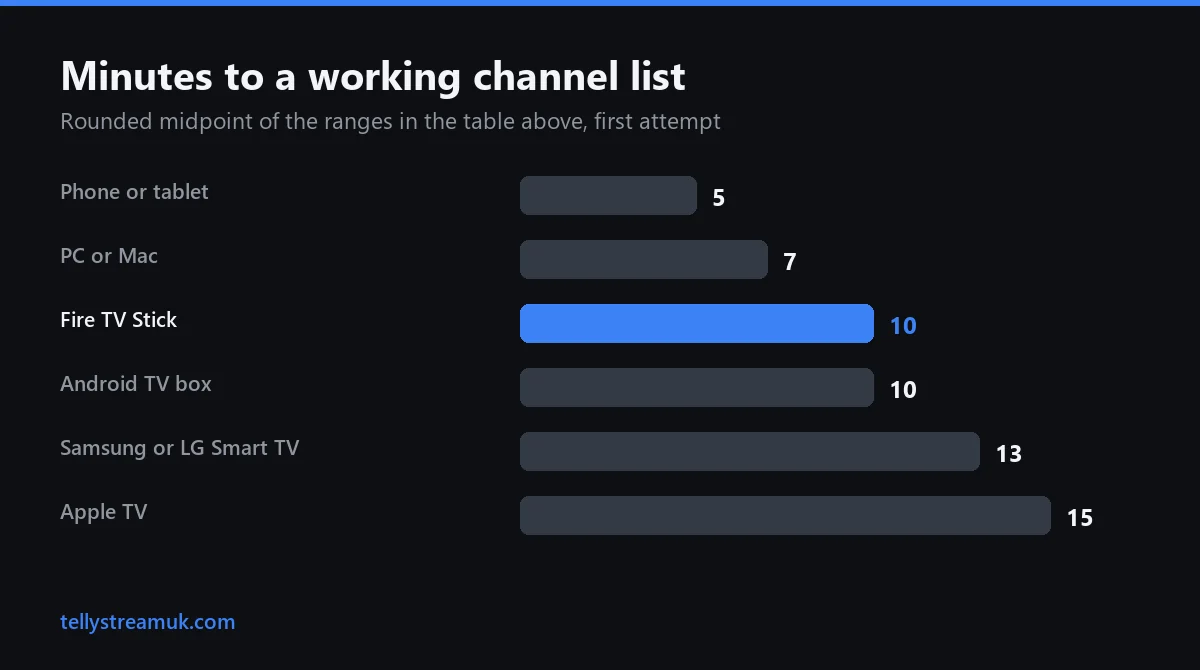
First attempt, including finding the details and reading them twice.
| Device | Realistic first attempt | What decides it |
|---|---|---|
| Phone or tablet | 5 minutes | A real keyboard and a clipboard |
| PC or Mac | 5 to 8 minutes | Same, with the email open in a tab |
| Fire TV Stick | 8 to 12 minutes | Text entry on the remote |
| Android TV box | 8 to 12 minutes | Play Store install, then the same typing |
| Samsung or LG Smart TV | 10 to 15 minutes | Store search is slow, and the set's MAC may need registering |
| Apple TV | 12 to 18 minutes | App Store only, and tvOS text entry is the slowest |
Give yourself the top of your device's range, uninterrupted, on a quiet evening rather than fifteen minutes before a kick-off. Nobody troubleshoots calmly at ten to three. If your IPTV installation is running well past these figures, something is wrong rather than slow, and it is nearly always the credentials rather than the app.
The Smart TV guide covers which app actually exists on Tizen, webOS and Android TV, and is worth reading first if that is your device. Hardware prices moved in September 2026, but nothing about the steps below changed with them.
Sent both an M3U link and Xtream Codes? Use the Xtream login
Plenty of providers issue both for the same account. Take the Xtream login, and not for the reason most pages give.
An M3U is a file. The player downloads all of it every time it launches and parses the lot before it shows you anything; on a big catalogue that can run to several megabytes and several seconds on a slow line. Xtream Codes is a login against an interface. The app fetches only the category list at startup, then asks for the sports channels when you open Sports. Less to download, less to hold in memory, which matters far more on a streaming stick than on a laptop.
- Faster cold start, because nothing loads until you ask for it
- Series and episodes keep their own structure and artwork instead of being flattened into channel entries
- The app can show your expiry date and how many connections the account allows, because the interface reports them
- The programme guide usually arrives on its own, where an M3U normally needs a separate XMLTV link
What it does not buy you is picture quality. An Xtream login is a catalogue layered over the same streams an M3U points at directly, so anyone describing it as higher quality is describing something that is not there. Choose it because the app behaves better, not because the football will look different.
The channels loaded but the TV guide is empty
A blank schedule is a separate setting, not a broken IPTV installation.
Where the XMLTV link actually goes
Most players keep the guide well away from the playlist. In IPTV Smarters it sits under the EPG section of the settings; in TiviMate it is a step in the playlist wizard labelled EPG source. Paste the link ending .xml or .xml.gz there, force an update, then leave it alone for a couple of minutes. A week of listings for thousands of channels is a large file, and parsing it is rarely instant on a stick.
Why an Xtream login usually fills itself in
An Xtream Codes account normally carries the guide with it; an M3U usually needs the XMLTV link adding by hand. That is the single most common reason one household sees a full guide on the living room television and a blank one in the bedroom.
Right programmes, wrong times
If the listings are correct but shifted by a whole number of hours, that is a timezone offset rather than bad data. Set the player's EPG timezone to your own rather than nudging hours by hand, and remember that British clocks move twice a year while plenty of guide feeds publish in UTC all year round. A guide that was right in January and wrong in April has not broken.
Give it one refresh cycle before deciding
Some players refresh the guide only once a day, so a source added late in the evening may not fill in until the next automatic refresh. Trigger a manual update once, then judge it the following day rather than tearing a working setup down that night.
What the message on screen actually means
Error text in IPTV players is terse, and two very different faults often share one sentence.
| What you see | What it usually means | What to do |
|---|---|---|
| Invalid credentials | One character is off, or a space came with the paste | Retype the last character; delete trailing spaces; check the port |
| Max connections reached | Another device is still holding a stream; a paused one still counts | Close the app there, not just the television |
| Account expired, while you are in date | The device clock is wrong, or the renewal went to a different line | Check the date and time on the device before contacting anyone |
| One channel dead, everything else fine | A fault at the source, not on your device | Report it by channel name; changing settings will not help |
| Everything stutters from about 8pm | Peak-time congestion on your line | Retest on a wire, at the hour it fails rather than at midday |
| Channels play, films and series do not | The on-demand catalogue has not loaded | Refresh the playlist, or re-add the account using the Xtream login |
| The app closes the moment it opens | The player's cache has filled up | Clear cache, never clear data, which deletes your login |
Only the stuttering row is really about broadband. Netflix publishes 5 Mbps for full HD and 15 Mbps for 4K, per stream; treat anything higher as headroom rather than a requirement. Contention, sustained rates and why a speed test at eleven in the morning tells you nothing are covered on the IPTV guide.
Connections, renewals, cost and the test worth running first
The questions that arrive a week later, answered now.
Install on many devices, watch on few
You can repeat the IPTV installation on every screen you own and sign in with the same details; the app is free and the login does not care how many copies exist. The limit is not installations but simultaneous streams. One connection carries one stream at a time, so a second person watching something else at the same moment needs a second connection. That is a thing to arrange before a Saturday afternoon, not during one.
What survives a renewal, a new router or a new television
A renewal on the same account keeps the same server address, username and password, so nothing is reinstalled and nothing is re-entered. Changing broadband provider or router changes nothing either, because the credentials belong to the account rather than to your home network. A new television means one more IPTV installation — the player, then the same details pasted in again. MAC portal setups are the exception: the account is bound to that particular box, so replacing the hardware means giving the provider the new MAC address first.
The one-minute test before you ask anyone for help
Open a different streaming service on the same device at the same moment. If that stutters too, the problem is your connection or your hardware rather than the service. Then try the same channel on a phone over mobile data with Wi-Fi switched off. If that is flawless, your home network is the culprit and a cable will very likely settle it. Running both turns a vague complaint into something a support team can act on.
What it costs to keep, once it works
Plans run £15 for one month, £35 for six and £55 for twelve, which is £4.58 a month on the annual term, and the free 24-hour trial takes no card details. Do the whole setup during the trial and test it at a busy hour, on the television you actually watch, before deciding anything. Full terms sit on the TellyStream homepage.
IPTV Installation — frequently asked questions
Should I use Xtream Codes or the M3U URL when my provider sends both?
How do I install an IPTV player on a Fire TV Stick when it is not in the Amazon app store?
My channels loaded but the TV guide is blank. How do I add an EPG?
Why does it say invalid credentials when my username and password are correct?
How many devices can I install on, and how many can watch at the same time?
Do I need to set everything up again when I renew, change router or get a new TV?
Set it up on a quiet evening
Twenty-four hours is enough to run the IPTV installation twice and still watch a match on it. No card details, no commitment.