IPTV on a Smart TV: which app runs on your set
IPTV on a Smart TV runs through a player app you install from the television's own store and then sign into with your subscription details. Samsung Tizen and LG webOS have their own builds; Android TV and Google TV use Google Play. TellyStream works on all of them, from £4.58 a month.
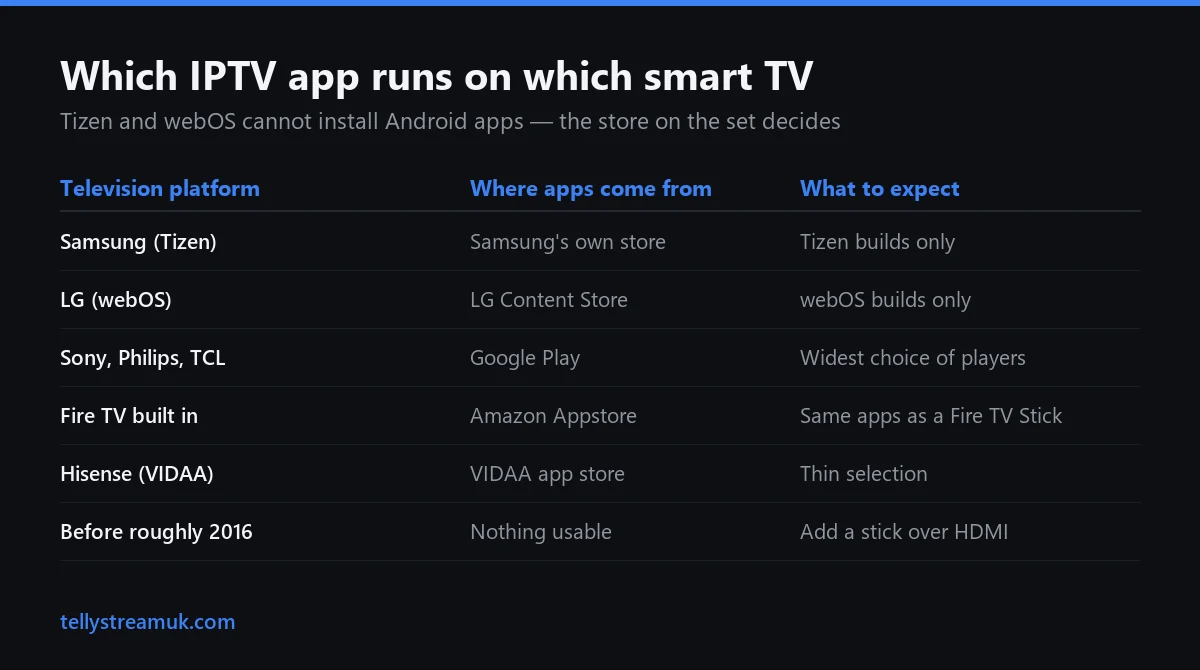
Which app runs on which television
The operating system decides this, not the badge on the bezel.
The thing that catches most people out is simple: a Samsung or an LG is not an Android device. Tizen and webOS are separate operating systems with their own stores, and neither will install an Android APK. An app a Fire TV forum swears by may not exist for your set — not because the television is old, but because nobody compiled that version.
Whichever app you land on, remember what it is. A player holds no channels; it holds your login. That is why a TellyStream subscription behaves the same on a 2019 Samsung as on a 2026 Sony.
| Television platform | Where apps come from | What to expect |
|---|---|---|
| Samsung (Tizen) | Samsung's own store, on the set | Tizen builds only; Android apps will not install |
| LG (webOS) | LG Content Store, on the set | webOS builds only; no TiviMate, ever |
| Sony, Philips, TCL (Android TV / Google TV) | Google Play | The widest choice of players |
| Fire TV built into the set | Amazon Appstore | Same apps as a Fire TV Stick |
| Hisense (VIDAA) | VIDAA app store | Thin selection; a stick is steadier |
| Any set from before roughly 2016 | Nothing usable | Add a stick over HDMI |
Samsung sets running Tizen
Samsung's own developer documentation puts Tizen 8.0 on 2024 models, Tizen 9.0 on 2025 and Tizen 10.0 on 2026 — worth knowing, because several app round-ups still claim the 2025 and 2026 ranges both ship Tizen 8.0. What matters in practice is what your set's store offers today: Smarters Player Lite, Smart IPTV and Flix IPTV are the usual landing spots.
LG sets running webOS
LG ships webOS TV 24, 25 and 26 on its 2024, 2025 and 2026 sets, moving the browser engine from Chromium 108 to 120 to 132. Player apps are built against that engine, which is why a newer LG handles a very large channel list more calmly than an older one. LG is also reported to be back-porting webOS 26 to 2025 sets.
Android TV, Google TV and built-in Fire TV
This is the easy group. Sony, Philips, TCL and several current Hisense ranges run Android TV or Google TV, so IPTV Smarters Pro, TiviMate and Smart IPTV are all available, and a set with Fire TV built in takes the same apps from the Amazon Appstore. One correction worth keeping: TiviMate is Android and Fire TV only. It has never run on Tizen or webOS.
Smart IPTV, the one-off fee, and why old guides lead nowhere
Smart IPTV, usually shortened to SIPTV, still publishes builds for Samsung Tizen, LG webOS, LG Netcast, Android and Google TV, and Fire TV. The reason so many walkthroughs naming it dead-end is duller than people assume: it moved from siptv.eu to siptv.app.
Activation is a one-time fee of 5.49 EUR per device, charged against the MAC address of the television it runs on. Read “per device” literally: a second television is a second payment, and a replacement set carries a new identifier.
Treat every other price in this category with caution. Published figures for TiviMate, IBO Player and the tvOS players contradict one another across the sites listing them, sometimes by a factor of five. Install the app, see what it asks for, and pay that.
How old is too old
There is no clean cut-off year, and any page handing you one is rounding. What decides it is whether a current build of a player exists for the operating-system version your set shipped with. Running IPTV on a Smart TV much older than a decade is rarely worth the effort.
The two-minute test beats any chart, including the one above: open your set's own store, search for IPTV, and see what comes back for your exact model. Manufacturers stop updating old platforms, so a set that ran a player in 2021 can quietly lose it.
Built-in app or a streaming stick
Cost and speed are the two things an IPTV Smart TV decision usually turns on, and they point in opposite directions depending on the age of the set.
If your television is recent, use what is already in it: one remote, one input, nothing extra behind the screen. If it is older the argument flips, and the tell is easy to read — when menus feel sluggish before you have pressed play, the bottleneck is the set's processor, not your broadband.
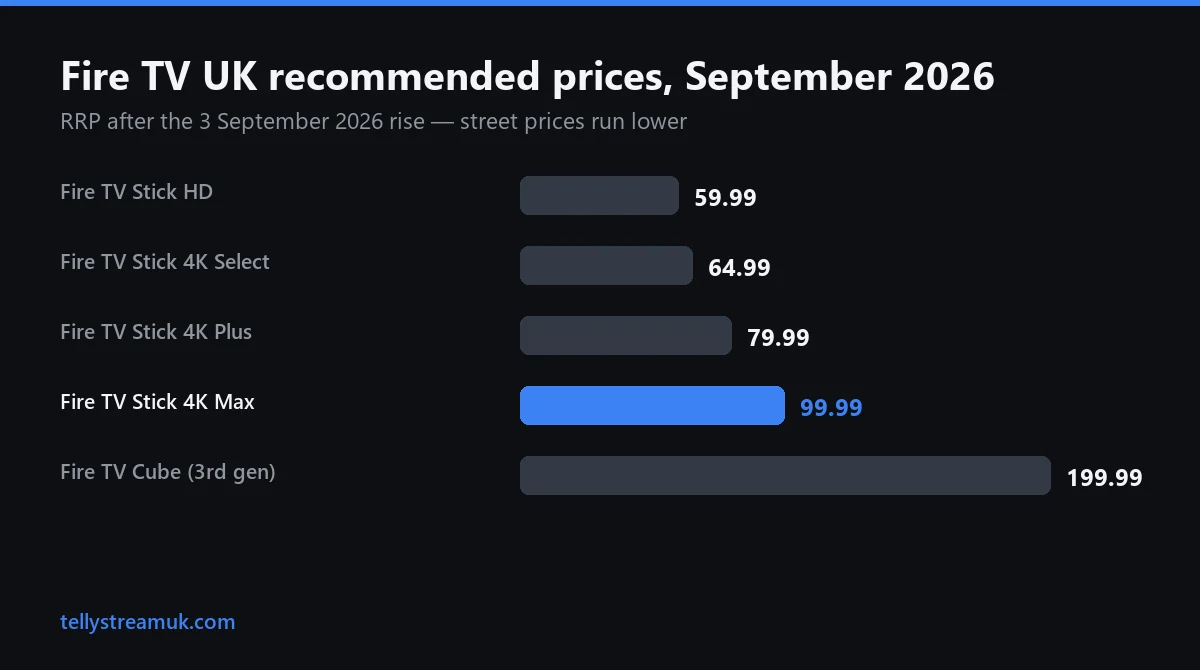
Fire TV hardware became much more expensive in the UK on 3 September 2026. Recommended prices are now £59.99 for the Fire TV Stick HD, £64.99 for the 4K Select, £79.99 for the 4K Plus, £99.99 for the 4K Max and £199.99 for the third-generation Fire TV Cube. Those are RRPs and street prices run well below them — the 4K Max has been seen at £47.99. Our Firestick guide covers which model earns its price.
Apple's box sits at the other end, at £199 for the 64GB Wi-Fi model and £249 for the 128GB version with an Ethernet socket — the reason to consider it where Wi-Fi never quite reaches. Either way, a stream does not improve because it arrived through a stick; what changes is how quickly the interface responds.
The four steps, and the one that goes wrong
Setting up IPTV on a Smart TV takes about ten minutes on a quiet evening.
1. Install a player from your television's own store
Search on the set itself, and search for a player rather than for a provider name. The app is free to install and does nothing until you sign in.
2. Get your login details
You need a server address, a username and a password, which come with the plan you choose on the TellyStream homepage or with the free 24-hour trial.
3. Sign in with Xtream Codes rather than pasting an M3U link
Both reach the same streams, so this is not a quality decision. An M3U is one file downloaded in full at every launch; Xtream Codes is a login queried as you go, which on modest television hardware is the difference between a two-second start and a twenty-second one.
4. Let the channel list finish loading
The first sync takes a couple of minutes and the app can look empty while it runs, so wait it out before deciding something has broken. Paste rather than type. Credentials, guide data and login errors are covered on our IPTV installation guide.
Picture settings worth changing before you blame the stream
Two settings most televisions ship with make live sport look worse, and both are on by default.
Turn off motion smoothing
Sold as motion interpolation, TruMotion on an LG or Motionflow on a Sony. It invents frames between the real ones, which gives football an odd, weightless look.
Leave Dynamic and Vivid alone
Those modes oversaturate colour and crush detail in dark scenes, which is where a floodlit night match loses its shadows. Standard, Cinema or a Sport mode gives a truer picture from the same stream.
Check which HDMI port the stick is in
Not every socket is equal. Plugging a 4K stick into an older HDMI input can quietly cap you at 1080p, and people then blame the service for a limit their own port imposed.
Why the television buffers when your phone does not
This is the most common complaint about IPTV on a Smart TV, and it is usually a radio problem rather than a stream problem. A phone bought last year has a newer Wi-Fi chip than a 2017 television, and plenty of sets join the 2.4 GHz band on their first day and never move off it.
| How the set connects | What it gives you | Worth doing when |
|---|---|---|
| Ethernet into the television | Steady throughput, no interference | The router is in the same room, or a cable can be hidden |
| 5 GHz Wi-Fi | Good speed, short range | The set is a room or two from the router |
| 2.4 GHz Wi-Fi | Long range, crowded band | Nothing else is possible in that room |
| The stick's own radio | Usually newer than the set's | The television is old but the line is fine |
Netflix publishes its own minimums: 3 Mbps for 720p, 5 Mbps for 1080p and 15 Mbps for 4K. Those are its figures for its own encodes, and the widely repeated “25 Mbps for 4K” is not one of them; the full bandwidth explainer sits on our IPTV guide. Test at eight in the evening rather than midday, since peak-time congestion is what breaks live sport.
IPTV on Smart TV — frequently asked questions
Which IPTV app works on a Samsung Tizen TV, and is it in the Samsung store?
Which IPTV app works on an LG webOS TV?
Is Smart IPTV still available for Samsung and LG televisions?
Do smart TV players charge a one-off activation fee?
Will IPTV on a Smart TV work if the set is ten years old, or not smart at all?
Does the built-in TV app give a better picture than a Fire TV Stick?
Try IPTV on your Smart TV for a day
A free 24-hour trial, no card details, installed on the television you actually watch.