IPTV guide: how it works, and how to judge a provider
IPTV is television delivered over the broadband line you already pay for, instead of a dish, an aerial or a cable. A provider gives you a login, a free app turns it into channels and a programme guide, and the picture arrives much as iPlayer does. This IPTV guide explains the jargon and how to test a provider.
How IPTV works, from the broadcast to your sofa
Four links in a chain, and none of them is a dish on the wall.
Television used to reach a house down one dedicated path: a dish on a wall, an aerial in the loft, a cable under the street. IPTV replaces that path with the broadband you already pay for.
The chain has four links. A broadcast feed arrives at the provider. An encoder compresses it and cuts it into segments a few seconds long. A server hands those out on request. Your player asks for the next one slightly early, which is why a healthy stream keeps a little in hand and a struggling one stutters rather than going black.
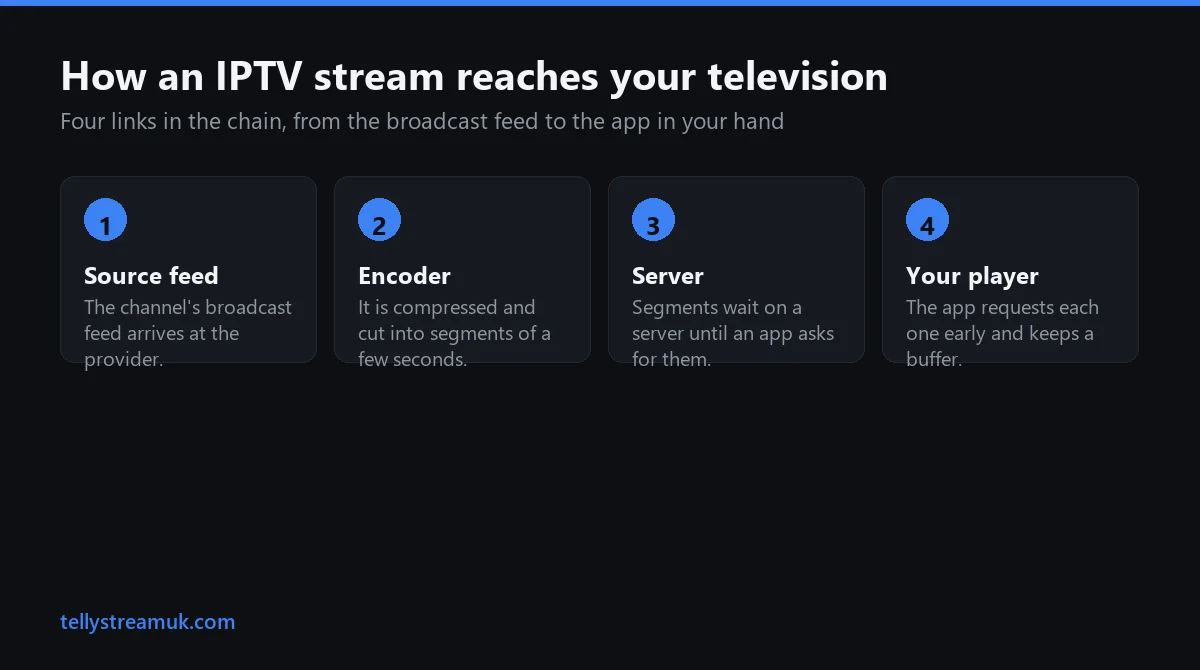
That last link is the one people misread. Your player is not receiving a broadcast but making rapid, ordinary web requests. A fault looks like a slow web page, not a snowy picture, so suspect the path to the server rather than the weather.
The jargon, one sentence at a time
Seven terms turn up in the first ten minutes. None of them is complicated.
The confusion here is vocabulary rather than difficulty. Read the list once and the setup stops looking technical.
- IPTV — Internet Protocol Television: live channels and on-demand content over ordinary broadband instead of a dish, aerial or cable.
- M3U — a plain text playlist. One URL holds the whole channel list, each entry naming a channel and its stream address. In UTF-8 it is an M3U8.
- HLS — HTTP Live Streaming, the segment-by-segment delivery method behind most online video, including this.
- Xtream Codes — a login rather than a file: a server address, a username and a password the app queries as you browse.
- EPG — the electronic programme guide, the now-and-next grid over your channels. It arrives as a separate XMLTV file.
- VOD — video on demand: films and box sets beside the live channels, browsable like a library rather than tied to a schedule.
- Connection, or line — one simultaneous stream. Two people watching different channels at once need two connections.
Two of those, M3U and Xtream Codes, are the only real decision a beginner makes, so this IPTV guide gives them a section of their own.
M3U or Xtream Codes: the one choice you have to make
Two doors into the same room, and one of them opens faster.
Most providers send both, in one message, with no explanation. They are two routes to identical streams; the difference is how your app fetches the catalogue, not what it plays.
An M3U link is a file. Your player downloads and parses the whole list every time it starts. On a large catalogue that runs to several megabytes: unnoticeable on a laptop, very noticeable on a streaming stick that must chew through it first.
An Xtream Codes login is a conversation. The app sends your username and password and gets structured data back: categories first, then the channels inside whichever one you open, with films, series and the IPTV programme guide as separate requests. It also learns your expiry date and connection limit.
| M3U playlist | Xtream Codes | |
|---|---|---|
| What you enter | One long URL | Server address, username, password |
| How it loads | Whole list at launch | Categories as you open them |
| Programme guide | Usually a second XMLTV URL | Usually carried by the login |
| Films and series | Flattened into the channel list | Proper series and episode folders |
| Account details | Not shown to the app | Expiry and connection limit visible |
| Underneath | The same streams | The same streams |
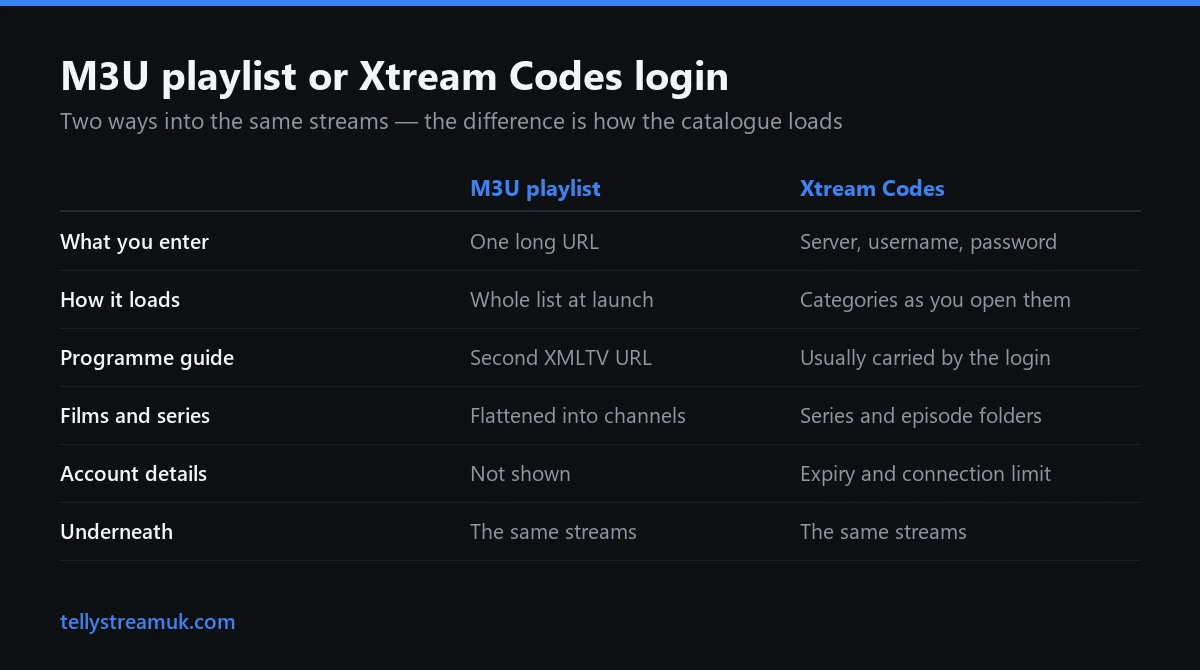
That last row matters most. An Xtream login is a tidier catalogue over exactly the streams an M3U points at, so anyone claiming it gives a better picture is mistaken: a faster menu, not a better image. Entering either is covered in our IPTV installation guide.
How much broadband you actually need
Less than the internet claims, but more consistently than a speed test suggests.
Netflix publishes recommended speeds for its own service, the most defensible public figures available: 3 Mbps or higher for 720p, 5 Mbps for 1080p, 15 Mbps for 4K Ultra HD. The widely repeated claim that 4K needs 25 Mbps is wrong at source.
| Picture | Netflix's published minimum | What that means in practice |
|---|---|---|
| 720p | 3 Mbps or higher | Fine on almost any line |
| 1080p HD | 5 Mbps or higher | The sensible target per stream |
| 4K Ultra HD | 15 Mbps or higher | Leave headroom for live sport |
Two caveats. They are Netflix's figures for Netflix's efficient encoding, so treat them as a floor; live sport uses more. And they describe one stream, so two televisions need the sum of both.
Consistency matters more than the headline number. British broadband is contended, so test at nine on a Saturday evening rather than eleven on a Tuesday morning. You will see national averages quoted elsewhere; this IPTV guide leaves them out, because the published figures contradict one another.
What changes when the signal comes down the broadband line
The technical differences from satellite and cable, without the sales pitch.
Watching feels almost identical. What changes is the route the signal takes, and the route decides what can go wrong.
| Satellite | Cable | IPTV | |
|---|---|---|---|
| How it reaches you | Dish with a clear view of the sky | A physical line into the building | Your existing broadband |
| Usual cause of trouble | Heavy rain, a shifted dish | Street works and line faults | Peak congestion, weak Wi-Fi |
| What a failure looks like | Freeze, then no signal | Everything drops together | Buffering, or a softer picture |
| Getting started | Engineer visit | Engineer visit | An app and a login |
| A second room | Another receiver box | Another set-top box | Another connection on the account |
None is inherently more reliable; they break for different reasons. IPTV removes the physical dependency — no dish to shift, no appointment to wait in for — and adds a dependency on one broadband line you can at least test in an evening.
Cost, contracts and where the law stands in Britain are a separate question, handled on our IPTV UK page rather than repeated here.
How to judge a provider, and how to test one
Five questions, none of them technical, all answerable in a message.
Every service looks the same on a landing page. What separates them is how plainly they answer these questions.
- Can I test it before paying? Anything worth using says yes without negotiation.
- How many streams does one subscription allow? Usually one. Find that out before a Saturday when two people want different matches.
- Is there a programme guide, and how far ahead? A channel list with no EPG is worse to live with than the channel count suggests.
- What happens when a channel stops working? A competent provider names your server and moves you; one that only says restart the router cannot.
- Is it prepaid, or does it renew itself? Prepaid means nothing is charged without a decision from you.
Two outweigh the rest: a straight yes to a trial, and a straight number for the connections. Both are checkable within a day, which is why any honest IPTV buying guide puts them first. TellyStream answers both on WhatsApp and runs a free 24-hour trial with no card taken.
Running the trial so it tells you something
- Name your device when you ask. Credentials differ by platform, and saying so saves a round of messages.
- Install the player while you wait. The choice is narrower on Samsung and LG, which our IPTV smart TV guide covers.
- Paste the login, do not type it. A remote is a poor way to enter a case-sensitive password.
- Watch at the worst hour. Seven to ten in the evening, on the television you actually use.
- Work through your own list. Time a couple of channel changes, and open a film and a catch-up programme.
Four beliefs that lead people to the wrong decision
Each of these sounds sensible and costs somebody money every week.
“It needs really fast broadband”
It needs consistent broadband, a different property. A steady 30 Mbps line beats a 300 Mbps line that collapses at peak: what breaks a stream is the dip, not the average.
“The app built into the television beats a cheap stick”
Usually the reverse. Manufacturers stop updating a smart platform a few years after the set is sold, while a streaming stick keeps both its updates and a faster processor.
“Buffering means the service is bad”
Sometimes. More often it is the wireless link between router and television. Play something else on the same device at that moment: if it stutters too, the network is the problem.
“More channels means a better service”
A catalogue of 30,000+ channels is a starting point, not a promise. Nobody watches thirty thousand channels. What matters is whether the forty you care about are stable and correctly labelled at the hour you want them, so count those during a trial and ignore the headline, ours included.
That is the whole of this IPTV guide. To see how it behaves on your own television, the TellyStream homepage lists the plans — £15 for one month, £35 for six and £55 for twelve, which is £4.58 a month annually — and the trial takes no card.
IPTV Guide — frequently asked questions
What does IPTV stand for, and how is it different from Netflix or BBC iPlayer?
What is an M3U playlist?
What are Xtream Codes, and should I use them instead of an M3U link?
What is an EPG, and does every IPTV service include one?
What does VOD mean on an IPTV service?
How do I test an IPTV service properly before I pay for it?
See whether the theory holds on your own television
A free 24-hour trial, no card details taken, on the device and the broadband line you actually use.